
Update the app your users already installed
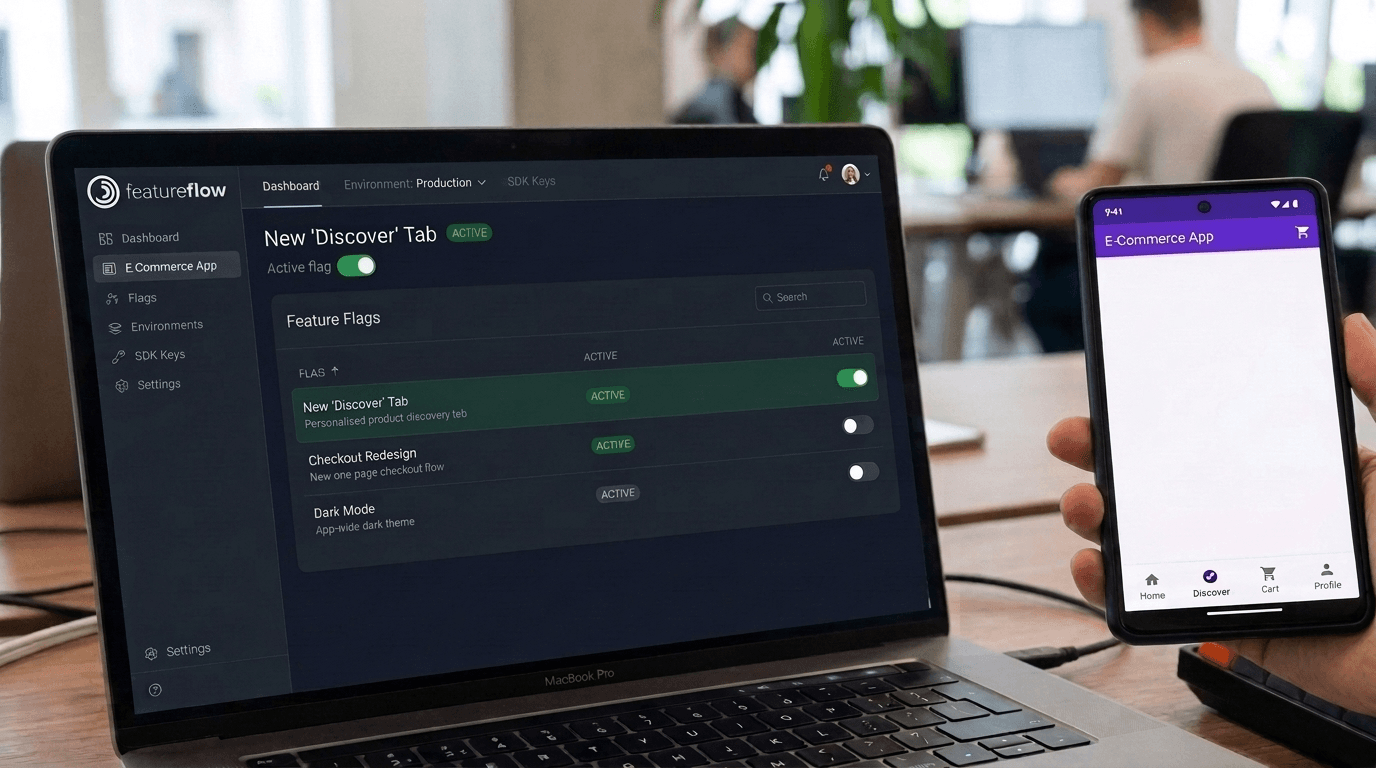
On mobile, the gap between deciding to change something and users seeing it is measured in review queues and upgrade rates. Ship the binary once — then release features and update configuration remotely, in every version in the field.
The release train is not your release schedule anymore
Every mobile team lives with the same physics: review queues in the way of every change, and old versions that never upgrade.
Store-gated releases
- Every change — even a copy tweak — waits in the review queue
- A production bug means an expedited review request and days of exposure
- Users on old versions keep the bug no matter what you ship
- Launch timing depends on when approval happens to land
Flag-gated releases
- The feature ships dark in the reviewed binary and turns on when you decide
- A kill switch reaches every version in the field on its next fetch
- JSON config updates app behaviour with no build at all
- One launch moment across iOS, Android and web — scheduled in advance
The binary is what the store reviews. Which features run inside it is yours to decide — after it ships.
Remote config
Reconfigure the app on the fly
type PromoConfig = {
  headline: string;
  discountPct: number;
  endsAt: string;
};

const evaluation = featureflow.evaluate('summer-promo');

if (evaluation.isOn()) {
  const promo = evaluation.jsonValue<PromoConfig>();
  return <PromoBanner {...promo} />;
}

return null;Scheduled launches
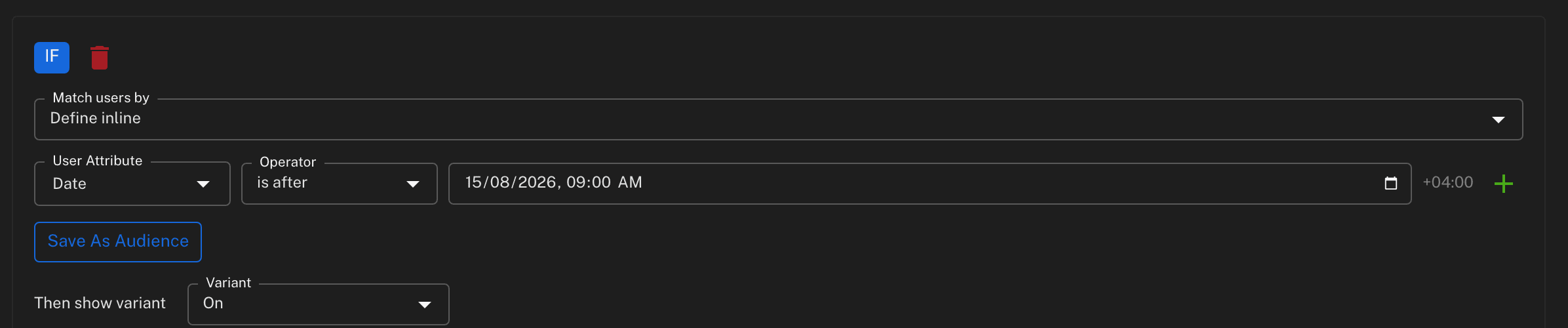
Launch at 9am without being up at 9am
Set the window in the dashboard
Run the promotion between these dates; show the feature during business hours.
Every device fires on time
No polling storm at launch, no origin traffic spike — the cached payload already carries the condition.
Marketing-coordinated releases
The feature goes live when the campaign does, across every platform at once.
Kill switch
Fix versions you stopped shipping months ago
Built for how mobile teams actually ship
React Native SDK
Plus browser JavaScript and React for the web side of the product.
CDN-cached delivery
Pre-evaluated payloads served from the edge — fast on every network, in every region.
Consistent across platforms
Identical bucketing in every SDK, so a user gets the same variant on the app, the website and the API.
Offline-safe
Results are cached on the device; failover variants define behaviour even on a cold start.
Progressive mobile rollouts
Release to 1% of devices before all of them — same flag, same dashboard.
Governed like everything else
Approvals, roles and the audit trail apply to mobile config changes too, on every plan.
The patterns in depth: feature flags for mobile apps.
Frequently asked questions
Is remotely toggling features allowed by the app stores?
Yes. The code ships inside the reviewed binary; flags and remote config control which of that reviewed code runs. This is standard practice across the industry — what you avoid is resubmitting a new build for changes the current binary can already handle.
How do changes reach installed apps?
The client SDK fetches a pre-evaluated, CDN-cached payload. When you change a flag or a config value, apps pick it up on their next fetch — no update prompt, no store release, no user action.
What about users who never update their app?
That is exactly who this is for. Old versions stay in the field for a long time regardless of your release cadence. A kill switch or a config change applies to every version that ships the SDK, including ones you stopped building months ago.
Can I coordinate a launch across iOS, Android and web?
Yes. All platforms evaluate the same flag with the same bucketing, so one change releases the feature everywhere at once — or to 5% everywhere at once. Date conditions evaluate on the device, so a scheduled launch fires without you being awake for it.
Which mobile frameworks are supported?
Client-side SDKs cover native iOS, native Android, React Native, browser JavaScript and React. Server-side SDKs (Node.js, Java, Go, Python, Ruby, .NET) cover the backend the app talks to, with identical bucketing across all of them.
Does the app keep working if the device is offline?
Yes. Evaluated results are cached on the device, so the app behaves exactly as it last did. You can also register failover variants so features have a defined value even on a cold start with no connectivity.
Ship your next mobile feature dark
Free forever tier with the React Native SDK, JSON config and scheduled targeting included. No credit card.
What else Featureflow solves
Kill switch
Turn a bad feature off without shipping a hotfix
Progressive rollout
Reach 1% of users before you reach all of them
Release pipelines
The rollout process runs itself instead of being remembered
Approvals & audit
Answer 'who changed production?' without an enterprise contract
Remote config
Change settings without a deploy or an app store review
A/B testing
Split traffic and record what each variant actually did