
A/B testing in the analytics tool you already use
Featureflow splits traffic and keeps each user on the same variant. Your flag exposures go to Amplitude, Mixpanel, PostHog, Segment or Google Analytics, and you read the result where your conversions already live. No second experimentation platform, no user-id mapping.
Integrations
One line sends exposures to your analytics tool
Amplitude, built in
amplitudeIntegration(amplitude) sends $exposure events and a per-flag user property. Amplitude Experiment picks them up with no configuration.
Mixpanel, PostHog, Segment, Google Analytics
exposureIntegration takes a function. Each recipe in the docs is a few lines that send $experiment_started, $feature_flag_called, Experiment Viewed or a GA4 event and user property.
Deduplicated and filtered
One event per user, flag and variant — a flag evaluated on every render does not send on every render. Limit exposures to the flags you are experimenting with, by key or by naming convention.
import Featureflow, {
  amplitudeIntegration,
  exposureIntegration,
} from 'featureflow-client';

const featureflow = await Featureflow.init(FF_KEY, user, {
  integrations: [
    // Amplitude: built in
    amplitudeIntegration(amplitude, { flags: ['checkout-v2'] }),

    // Any other tool: write the event
    exposureIntegration(({ key, variant }) => {
      mixpanel.track('$experiment_started', {
        'Experiment name': key,
        'Variant name': variant,
      });
    }, { flags: (key) => key.startsWith('exp-') }),
  ],
});Assignment
The same user gets the same variant, everywhere
Stable per user
No flip-flopping between versions on refresh, and widening the rollout never reshuffles who is already assigned.
Identical across services
Your API, web app and mobile app agree, as long as they pass the same ID.
Independent between experiments
Each flag buckets separately, so the users who got variant A in this test are not the users who get variant A in the next one.
Variants
Variants that carry their own parameters
type Paywall = { headline: string; trialDays: number };

const paywall = featureflow
  .evaluate('paywall-copy')
  .jsonValue<Paywall>();

renderPaywall({
  headline: paywall?.headline ?? 'Start your free trial',
  trialDays: paywall?.trialDays ?? 14,
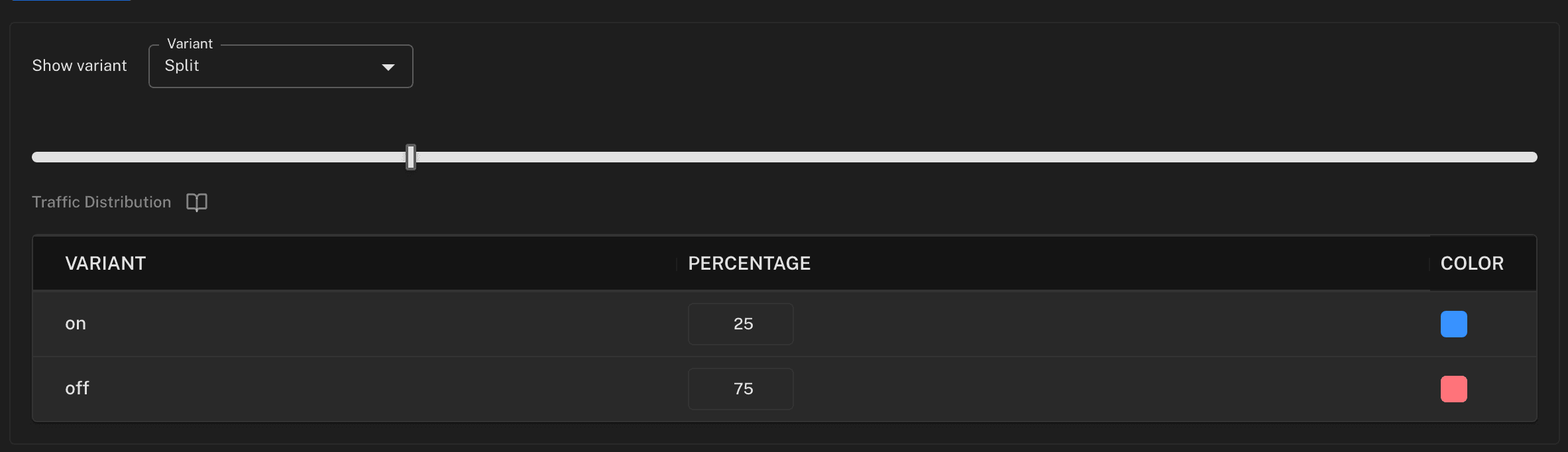
});Check the split before you trust the result. If you configured an even three-way split and one variant is answering a fraction of the traffic, no analysis downstream will fix it.
Results
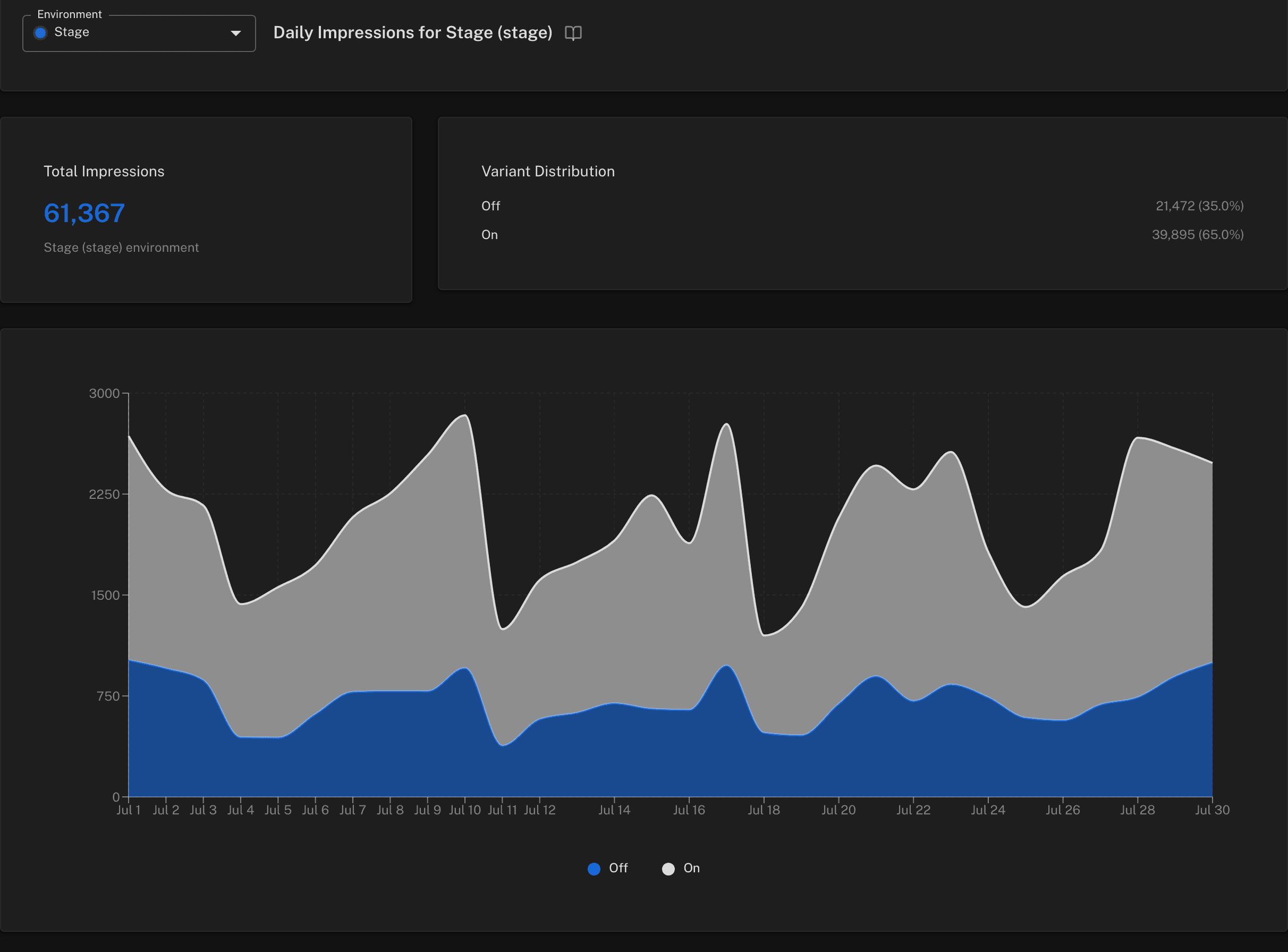
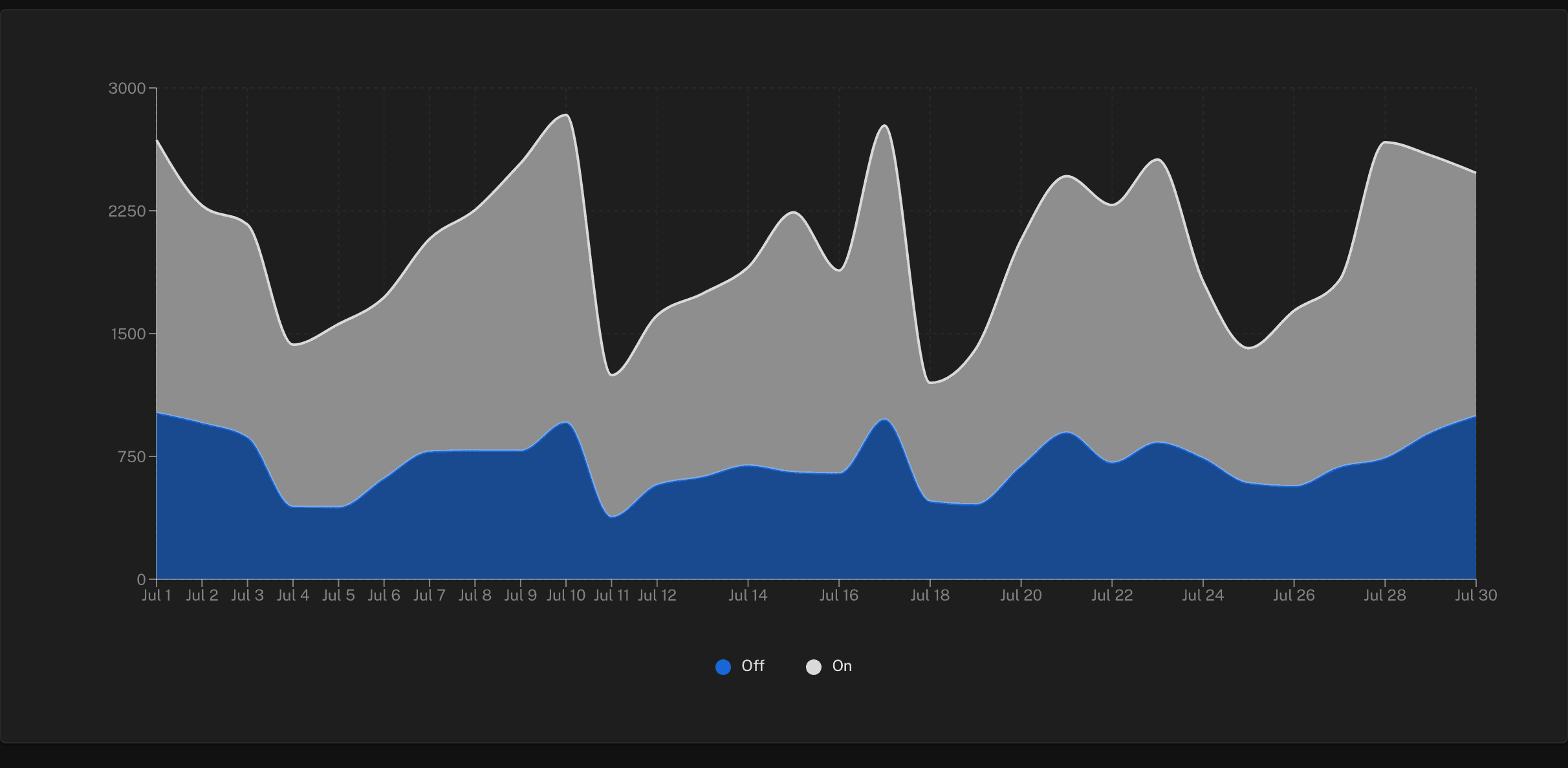
Evaluation counts per variant, so you can trust the split
Where the work is split
Featureflow is the assignment layer. Your analytics tool is the analysis layer. Neither has to pretend to be the other.
Featureflow decides
Who gets which variant, on every request and in every service, and how many evaluations each variant answered.
Your analytics tool measures
Conversions, retention and significance, on the events you already collect, segmented by the variant Featureflow sent.
You keep one flag
The experiment flag is the rollout flag. When a variant wins, roll it to 100% on the same flag and archive the rest.
One flag does the whole lifecycle: it ramps the feature safely, holds a stable split while you learn which variant wins, and turns the whole thing off if the experiment itself is the problem — without a deploy at any point. Setup for each tool is in the A/B testing docs.
Frequently asked questions
Which analytics tools can I read results in?
Amplitude has a one-line built-in integration. Mixpanel, PostHog, Segment and Google Analytics 4 each have a documented recipe that sends the exposure event that tool's experiment report expects. Any other tool works the same way: exposureIntegration takes a function, and you write the event.
Do I have to map user ids between Featureflow and my analytics tool?
No. Exposure events are sent through your own analytics SDK instance in the browser, so they carry whatever user or device identity that tool already has. Featureflow never sees your analytics data.
Will this inflate my analytics bill?
Exposures are deduplicated per user, flag and variant for the page's lifetime, so a flag evaluated on every render sends one event. You can also limit exposures to the flags you are experimenting with, by key or by naming convention, so kill switches and infra toggles never send anything.
How are users assigned to variants?
Featureflow buckets each user by the ID you choose — a user id, an account id, a device id. The same user gets the same variant on every request and in every service that passes the same ID, and widening a rollout never reshuffles who is already assigned.
Can a variant carry more than a name?
Yes. Each variant can carry a JSON payload alongside its key, so a variant ships its own parameters — copy, thresholds, which model to call — instead of needing a code branch per variant.
Does Featureflow calculate statistical significance?
No. Featureflow decides who gets which variant and reports evaluation counts per variant so you can confirm the split is healthy. Significance, sequential testing and variance reduction happen in your analytics tool, which already has your conversion data.
Run your next experiment on the flag you already have
Multivariate flags, traffic splits and analytics integrations are on every plan, including Free — no credit card.
What else Featureflow solves
Kill switch
Turn a bad feature off without shipping a hotfix
Progressive rollout
Reach 1% of users before you reach all of them
Release pipelines
The rollout process runs itself instead of being remembered
Approvals & audit
Answer 'who changed production?' without an enterprise contract
Remote config
Change settings without a deploy or an app store review
Mobile releases
Update the app your users already installed