
Manage Feature Flags Without Leaving Your Editor: The Featureflow MCP Server
Your AI assistant just wrote the flag-gated code. So why are you opening a browser tab to create the flag?
Wrapping new code in a feature flag is the easy half of the workflow. The other half - creating the flag, checking what's enabled in staging, turning it on for a percentage of production - has always lived in a dashboard. That's a context switch, and in an agentic coding session it's worse than that: your assistant writes evaluate("new-checkout") and then has no idea whether that flag exists, what its rules are, or which environments it's live in. You become the API between your editor and your flag platform.
Your Editor Becomes the Control Plane
The Featureflow MCP server closes that gap. It's an open source Model Context Protocol server, published to npm as featureflow-mcp, that gives Claude Code, Cursor, GitHub Copilot, and any other MCP client direct access to your flags, projects, and environments. Setup is one command:
claude mcp add --env FEATUREFLOW_API_TOKEN=api-your-token \
  --transport stdio featureflow -- npx -y featureflow-mcp
From there, flag management is a sentence, not a workflow:
- "Create a feature called
new-checkoutin thewebappproject" - "What features are currently enabled in staging?"
- "Disable
beta-featurein all environments"
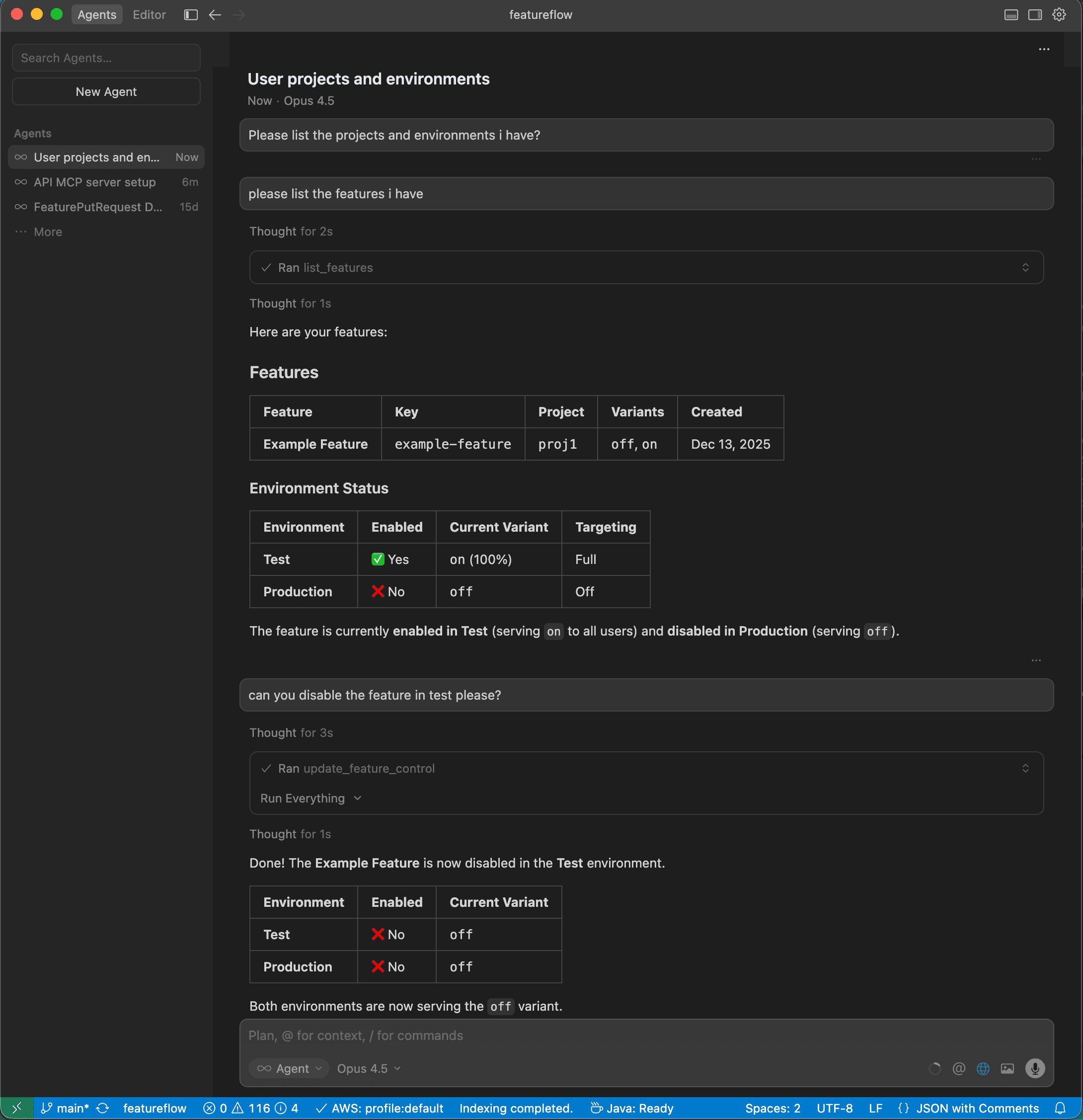
Under the hood the server exposes typed tools for the full lifecycle: projects, features, per-environment feature controls, environments, targeting attributes, and SDK API keys. Features are addressed by a unified key - projectKey:featureKey, like webapp:new-checkout- so there's no ambiguity about which flag your assistant is touching.
Why This Matters for Agentic Workflows
The real win isn't saving a browser tab. It's that your coding agent can now complete the loop it was already halfway through: write the flag-gated code, create the flag, verify it defaults to off, and hand you a change that's safe to merge. The pattern we've written about before - AI ships the code, a flag gates the release, a human decides when users see it - stops being two disconnected systems.
Access is scoped the way you'd want it: the server authenticates with a personal access token (created under Administration → API Tokens, prefixed api-) that carries your account's permissions. Keep it in your shell environment rather than a committed config - MCP clients expand ${FEATUREFLOW_API_TOKEN} from your environment, so team-shared configs never need to contain a secret.
Feature flags were already the guardrail that makes fast shipping safe. Putting them within reach of your editor - and your agent - removes the last bit of friction between writing code and releasing it deliberately. Full setup instructions for Claude Code, Cursor, and other clients are in the Featureflow docs and the Featureflow GitHub.
#FeatureFlags#MCP#AIDevelopment#DeveloperExperience#DevOps
Put your flags where your agent works
Start free with Featureflow, create an API token, and run npx -y featureflow-mcp.
Related Articles
Claude Opus 5.5 vs Fable 5.1 vs GPT-6 Astra for coding
Coding benchmarks, price per token, tokens per task and breaking changes for the three frontier models released in September 2026, using figures from Anthropic and Artificial Analysis.
Feature Flags for AI Agent Tools: Gate What Your Agent Is Allowed to Do
An agent's tool list is its blast radius. Put every side-effecting tool behind a feature flag — roll new tools out to a slice of tenants, cap their limits with JSON variants, and kill one tool without taking the agent down.
Feature Flags for LLM Rollouts: Switch Models and Prompts Without Redeploying
Every LLM upgrade is a gamble until you can test it on real traffic. Feature flags give your AI inference layer gradual rollouts, instant kill switches, and live A/B testing — no redeploy required.