
Introducing Release Pipelines: Define Your Rollout Once, Every Feature Follows It
Every team has a release process. Enable in dev, verify in test, run it past staging, target internal users in production, then open it up to everyone. The problem is that for most teams the process lives in a wiki page or someone's head — and every feature re-implements it by hand, one environment at a time.
Release Pipelines make that process a first-class thing in Featureflow. Define it once per project, assign features to it, and advance each feature phase by phase — with the right targeting applied and the right people approving, every time.
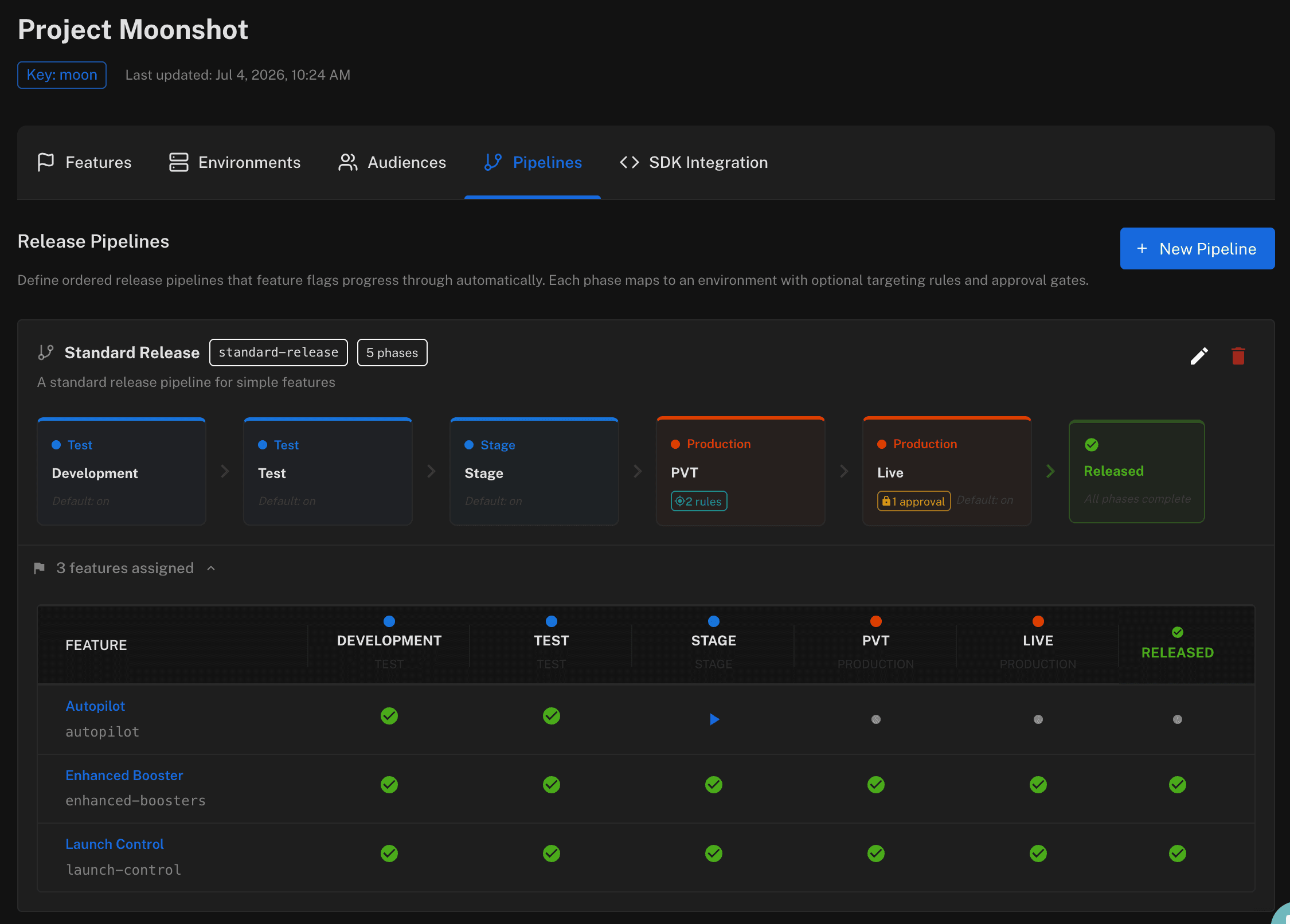
Phases, Not Checklists
A pipeline is an ordered set of phases, each mapped to one of your environments. A phase defines what happens when a feature reaches it:
- Default targeting rules — a PVT phase can target internal users only; a Live phase can open production to everyone. Rules are a template, applied the moment a feature advances into the phase.
- On or off — most phases enable the feature in their environment, but a phase can just as well switch one off.
- Approval gates — require one or more approvals before the phase applies. Combined with per-environment and per-feature approval settings, production changes get reviewed without slowing down dev and test.
The same environment can appear in more than one phase — a production verification phase for your testers, then a separate go-live phase for the world.
One Click to Advance
Assign a feature to a pipeline and its Overview tab shows exactly where it is: which phases have been applied, the current phase, and what's next. Advancing shows you precisely what will change — the environment, the rules, whether approval is required — and takes an optional comment for the audit trail. If the phase is gated, the advance is submitted for review and the phase shows a pending-approval state that links straight to the request.
When the final phase is applied, the feature is released — and the pipeline board gives product and engineering one shared view of every in-flight feature's progress.
👉 Release Pipelines are available now on all plans. See the Release Pipelines docs for a full walkthrough, or head to www.featureflow.com to get started.
#FeatureFlags#ReleasePipelines#ProgressiveDelivery#Approvals#ContinuousDelivery
Give your features a path to production
Define your release process once and let every feature follow it — start free and build your first pipeline in minutes.
Start Now (Free)Related Articles
Claude Opus 5.5 vs Fable 5.1 vs GPT-6 Astra for coding
Coding benchmarks, price per token, tokens per task and breaking changes for the three frontier models released in September 2026, using figures from Anthropic and Artificial Analysis.
Build vs buy: what a homegrown feature flag system actually costs
The first flag is a boolean and takes eleven minutes. Then come the admin UI, the caching layer, the audit trail and the second SDK. An honest cost breakdown - including the cases where building your own is still the right call.
Top 10 Feature Flag Management Tools in 2026
Featureflow, LaunchDarkly, Statsig, Unleash, Flagsmith, ConfigCat, GrowthBook, PostHog, Harness FME and DevCycle, compared on targeting, runtime config, governance, SDKs and pricing you can predict. We put ourselves first and say why.