
Feature Flags and Webhooks: Show Flag Changes Where Your Team Is Already Looking
The error rate doubles at 14:32. The last deploy was at 09:10. Forty minutes into the incident, someone finally asks in Slack: "did anyone change a flag?"
Somebody had. A rollout went from 10% to 100% at 14:30, and it took forty minutes to find that out, because nothing told anyone it had happened.
This is the trade you make when you separate deploying code from releasing it. The release no longer happens when you deploy — it happens when someone changes a flag. But your tools never caught up. Your CI still posts a marker to the dashboard for every deploy. Your runbook still says "check recent deploys". Neither of them knows a flag exists.
Featureflow records every change in its audit log, so the answer was always there. It was just in a browser tab nobody had open.
Send the change to people instead of making them look for it
A webhook is just Featureflow calling a URL of yours whenever something changes. You give it an address, it sends a small JSON message the moment a flag is turned on or off, retargeted, created or deleted. Nothing to poll, nothing to schedule.
Each message tells you which flag changed, which project and environment it changed in, who changed it, when, and a link straight back to the flag. Routine edits — renaming a flag, tidying up a description — aren't sent, so what arrives is only the things that could have changed how your app behaves.
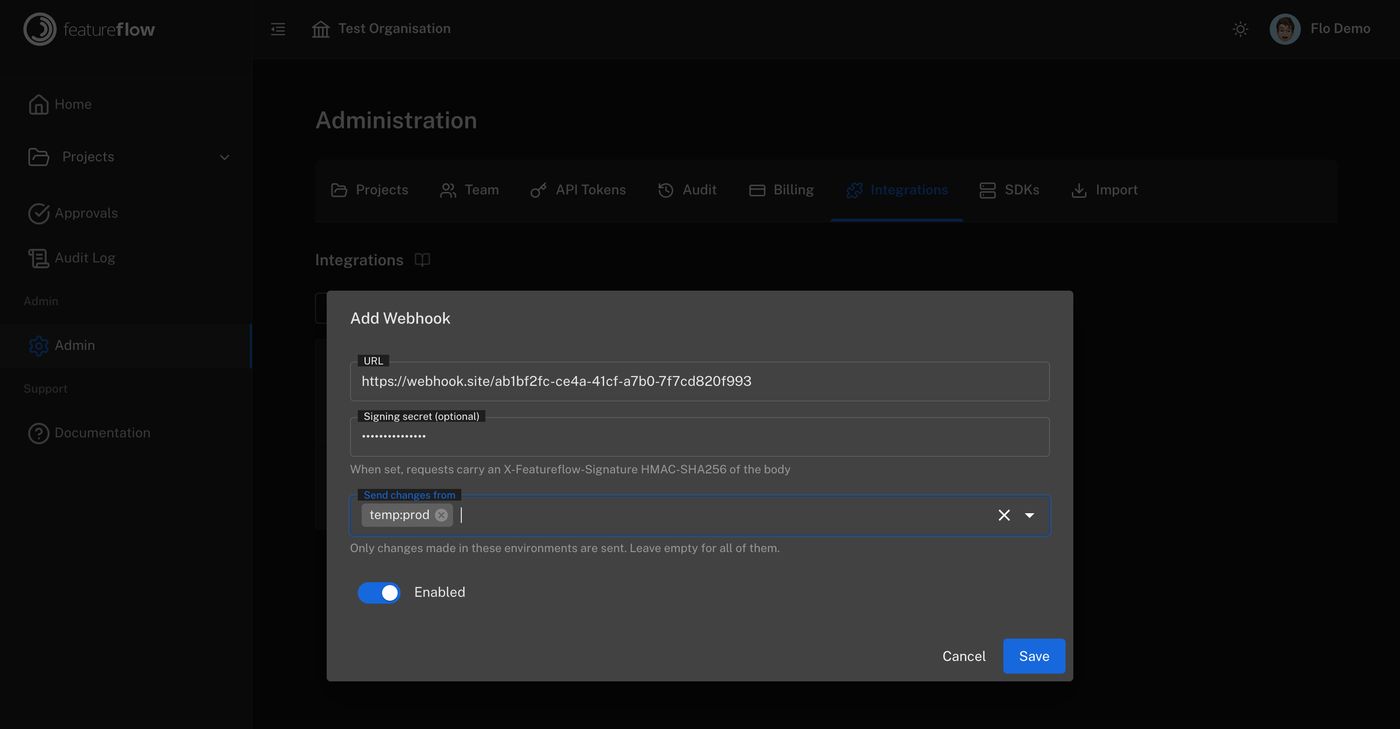
Writing the receiver
There are two things worth getting right, and both are quick.
Check the message is genuine. Your webhook URL is open to the internet, so anyone who finds it can post to it. If you set a signing secret, Featureflow signs each message with it, and you can check that signature before you trust anything in the message. Use the raw request body for the check — not a version your framework has parsed and rebuilt.
Reply straight away. Send back a 200 first and do your actual work afterwards. If your endpoint is slow, Featureflow assumes it failed and sends the message again — and you end up with duplicates.
import crypto from 'node:crypto';
import express from 'express';

const app = express();

// express.raw gives us the untouched request body, which is what the signature covers
app.post('/hooks/featureflow', express.raw({ type: 'application/json' }), (req, res) => {
  const expected = 'sha256=' + crypto
    .createHmac('sha256', process.env.FEATUREFLOW_WEBHOOK_SECRET!)
    .update(req.body)
    .digest('hex');
  const received = req.get('X-Featureflow-Signature') ?? '';

  const valid = expected.length === received.length
    && crypto.timingSafeEqual(Buffer.from(expected), Buffer.from(received));
  if (!valid) return res.sendStatus(401);

  res.sendStatus(200); // reply first, then do the work

  const change = JSON.parse(req.body.toString());
  if (change.environment.unifiedKey !== 'web:production') return;

  void annotateDashboard({
    title: change.title,           // "Sam Rivers updated Checkout v2 in production"
    at: change.occurredAt,
    tags: change.tags,             // feature:checkout-v2, change:updated, ...
    link: change.url,
  });
});
annotateDashboard is the part you write, and it depends entirely on what your team uses — a marker on a Grafana graph, a change event in PagerDuty, a row in a deployments table, a note in the incident channel. The receiver above is the same everywhere and you write it once.
Where to send them
Start with your dashboards. Draw each flag change as a line on your latency and error graphs, next to the deploy markers you already have. That one change answers "did anyone change a flag?" before anyone has to ask it.
After that, send production changes to wherever your on-call engineer is already looking, and keep a copy anywhere you need a record of what changed in production and when.
One thing to set up while you're there: choose the environments when you add the webhook, rather than filtering in your own code. Then staging changes never get sent at all, and there is no noise to ignore.
Featureflow has ready-made integrations for Datadog, Grafana, Slack and Jira, plus a general-purpose signed webhook for anything else. Add one under Administration → Integrations, send a test event to check it arrives, and your next flag change shows up where your team is already looking.
#FeatureFlags#Webhooks#Observability#IncidentResponse#ContinuousDelivery
Put every flag change where your team is already looking
Start free with Featureflow — signed webhooks and native integrations for the tools you use during an incident.
Start Now (Free)Related Articles
Retiring an API version without a surprise outage
A shutdown date hits every client at once, including the cron job nobody owns. Gate v1 with a per-client flag, brown out a slice of traffic, and turn a client back on if they still need the old routes.
Feature flags that only work when another flag is on
express-payments gets turned on for users who are still on the old checkout, and the page breaks while the dashboard looks healthy. Fold the two flags into one, or read both in a single function.
Five questions to ask when a pull request adds a feature flag
The flag is usually two lines inside a much bigger diff, so the review spends its time on the feature. Check the name, the failover, the tests, where it is evaluated, and who deletes it.