
Feature Flags and Compliance: How Audit Trails Protect Regulated Teams
In a regulated environment, a feature that ships without a paper trail isn't a release — it's a liability.
Healthcare, finance, and payments teams operate under strict frameworks: SOC 2, HIPAA, PCI-DSS. Every change to production must be traceable. Auditors want to know what changed, when it changed, who authorised it, and how quickly it could be reversed if something went wrong.
Traditional deployments make this hard. A git merge tells you when code landed in the repo — it doesn't tell you when the feature went live to users, which users were affected, who approved the rollout, or how it was turned off. That gap between "deployed" and "enabled" is exactly where compliance risk lives.
The Problem With Deployment-Level Traceability
When a deployment is your release event, your audit trail is a build log. It records commits and pipeline runs — not intent. There's no structured record of who decided to expose a feature to users, what criteria gated it, or whether a human approved the change before it affected real accounts.
That makes incident response slower too. When something breaks at 3am, "what changed?" becomes an archaeology exercise across four systems. The answer should be instant.
Feature Flags Create a Feature-Level Audit Record
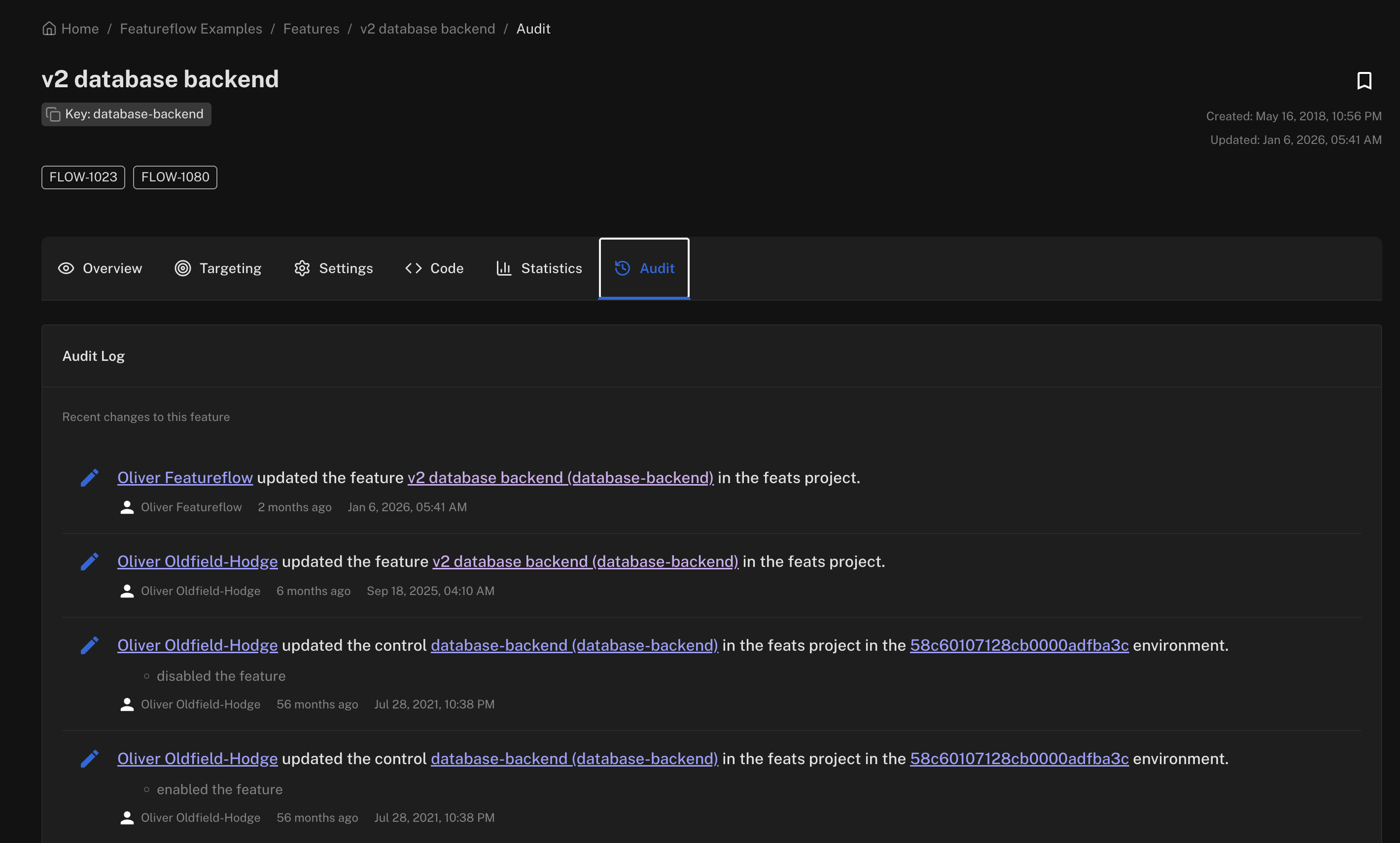
Feature flags shift your release event from the pipeline to the flag evaluation. That shift creates a natural audit log:
- Who created or modified the flag — linked to an authenticated user or service account.
- When the flag was turned on or off — timestamped, immutable.
- Which users were in scope — via targeting rules (user IDs, account tiers, percentage rollouts).
- How it was reversed — the flag history shows every state transition.
This is the kind of structured evidence auditors actually ask for. Not a wall of git commits — a clear timeline of intent and action at the feature level.
Controlled Rollout as a Compliance Control
Flags also let you enforce access controls at the feature level, not just the deployment level. Rolling out a new payment flow only to accounts in a specific region, or gating a data-sensitive feature behind an explicit user attribute, is a compliance control in itself.
Here's what that looks like with the Featureflow JavaScript SDK:
import featureflow from 'featureflow-client';

const user = {
  key: account.id,
  attributes: {
    tier: account.tier,       // e.g. 'enterprise'
    region: account.region,   // e.g. 'EU'
  },
};

const client = featureflow.init(API_KEY, user);

if (client.evaluate('new-payment-module').value() === 'on') {
  // Only rendered for users matching your targeting rules.
  // The flag evaluation is logged — traceable, reversible.
  renderNewPaymentFlow();
}
Targeting rules in Featureflow are declarative and version-controlled — you can show exactly what criteria were active at any point in time. That's a meaningful difference from ad-hoc conditional logic scattered across your codebase.
Instant Rollback Is Also a Compliance Story
Regulators don't just care whether changes are traceable — they care whether you can respond fast when something goes wrong. Mean time to recover (MTTR) is a metric that appears in SOC 2 audits for a reason.
A flag kill switch reduces MTTR from "redeploy + hotfix" to "flip a toggle." No pipeline run, no war room, no rollback PR. The flag change is logged, timestamped, and tied to an authenticated actor. That's exactly the kind of documented response process that auditors want to see.
Compliance teams in regulated industries often push back on speed — worried that continuous delivery means continuous risk. Feature flags reframe the conversation. You're not deploying to production recklessly; you're deploying dark and enabling deliberately, with full traceability at every step.
👉 See how Featureflow handles targeting, rollouts, and flag history at featureflow.com.
#FeatureFlags#Compliance#AuditTrails#ContinuousDelivery#DevOps
Traceable releases start here
Start free with Featureflow — feature-level audit trails, targeting rules, and instant kill switches out of the box.
Start Now (Free)Related Articles
Build vs buy: what a homegrown feature flag system actually costs
The first flag is a boolean and takes eleven minutes. Then come the admin UI, the caching layer, the audit trail and the second SDK. An honest cost breakdown - including the cases where building your own is still the right call.
Top 10 Feature Flag Management Tools in 2026
Featureflow, LaunchDarkly, Statsig, Unleash, Flagsmith, ConfigCat, GrowthBook, PostHog, Harness FME and DevCycle, compared on targeting, runtime config, governance, SDKs and pricing you can predict. We put ourselves first and say why.
Scheduled Releases with Feature Flags: Launch at 9am Without Anyone Awake
A launch time shouldn't depend on someone clicking a button at 09:00. Put the date in the targeting rule, deploy days early, and let every SDK flip the feature at the same instant — no cron job, no deploy window, no one on standby.