
Feature Flag Hygiene: How to Stop Flags Becoming Tech Debt
Every feature flag you add is a promise to clean it up later. Most teams never keep that promise.
Flags start as a superpower — decouple deploys from releases, run safe rollouts, kill a bad feature in seconds. But left unmanaged, they accumulate. Six months later you're staring at a flag called new_checkout_flow_v2_FINAL and nobody knows if it's still doing anything.
Flag debt is sneaky. It doesn't break your build. It just quietly makes your codebase harder to reason about, harder to test, and eventually dangerous — a stale flag controlling a code path that everyone assumed was long gone.
Name Flags for Their Lifespan
The most useful discipline you can adopt is distinguishing flag types from the moment you create them. Martin Fowler's taxonomy is still the clearest: release flags are temporary (days to weeks); experiment flags are medium-lived (weeks to months); ops/kill-switch flags can be permanent; and permission flags live as long as the entitlement does.
A simple naming convention makes lifespan visible at a glance:
Any flag under release/ or exp/ should have an owner and a target removal date set at creation time — not retrospectively, when nobody remembers what it does.
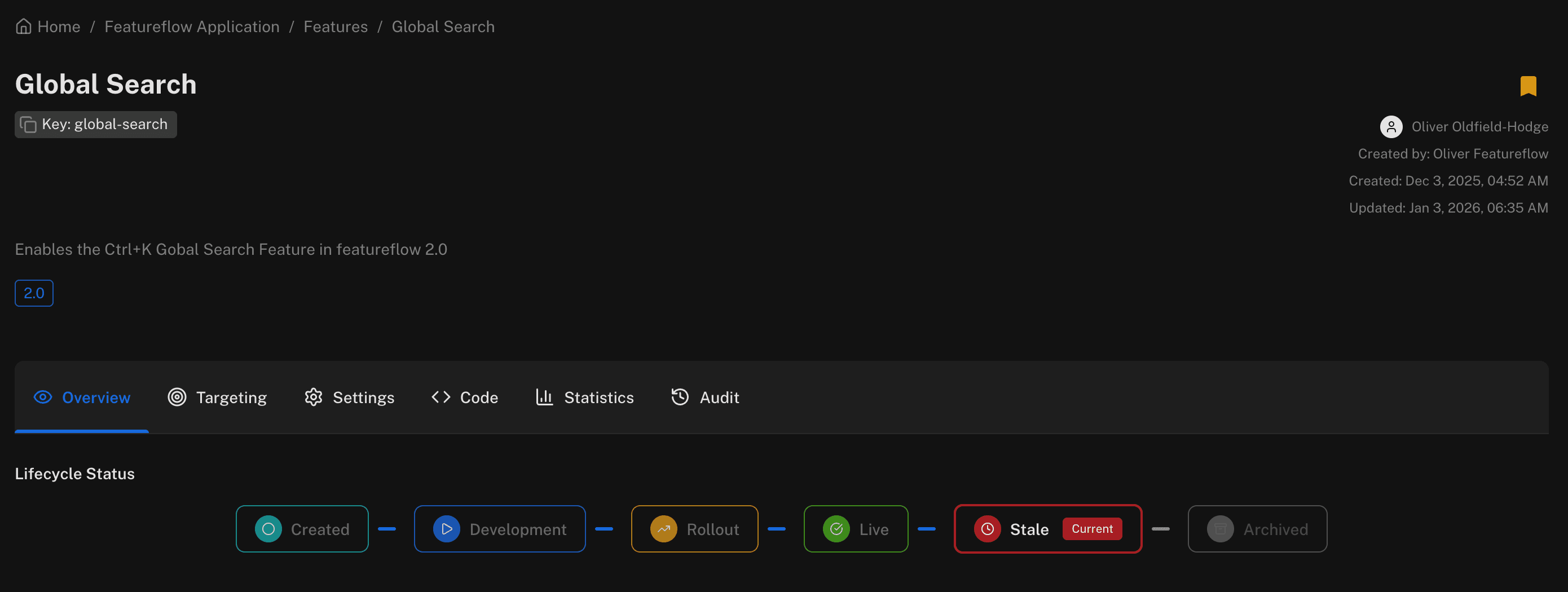
global-search flag in Featureflow showing a Stale lifecycle status — it was last updated in January 2026 and is overdue for cleanup.Build a Removal Workflow
Creating a flag is easy. Removing it is where teams stall. The flag is "live to 100%" but the old code path is still wrapped in anif (flagEnabled)block that nobody dares touch.
A removal checklist that actually gets used:
- Flag has been at 100% (or 0%) for at least one full release cycle
- The non-default code path has been deleted from source
- The flag evaluation call has been removed from all SDKs
- The flag is archived in your management platform (not just ignored)
- A PR description links back to the original ticket
The last point matters more than it looks. Archaeology is half of flag debt — when you inherit a codebase and find enableNewPricingPage, you have no idea if that was A/B test from 2023 or an active experiment. A linked ticket makes it answerable in 10 seconds.
Audit Regularly — and Automate It
A quarterly flag audit sounds good on paper. In practice it gets skipped every quarter. Automate the nudge instead:
- Flag platforms like Featureflow track when a flag was last evaluated — stale flags show up automatically.
- Pipe that data into your ticketing system: any flag not evaluated in 30 days gets a Jira/Linear ticket opened automatically.
- A lint rule or CI check that fails if a flag older than your threshold still appears in source is surprisingly effective.
With Featureflow, you can see evaluation history per flag across environments. That makes it straightforward to identify orphaned flags — ones that are defined in the platform but never called from running code — and prioritise them for removal.
The Real Cost of Not Doing This
Stale flags aren't just ugly. They're risky. The Knight Capital incident in 2012 — where a firm lost $440 million in 45 minutes — was partly caused by a dormant code path that was unexpectedly re-activated by a deployment flag. That's an extreme example, but the pattern is common: old flag, forgotten branch, bad day.
Good flag hygiene is boring, which is exactly the point. You want your flags to be uneventful — short-lived, well-named, cleanly removed. The exciting incidents happen when hygiene breaks down.
👉 See how Featureflow manages flag lifecycles at docs.featureflow.io.
#FeatureFlags#TechDebt#ContinuousDelivery#FlagHygiene#DevOps
Keep your flag inventory clean
Start free with Featureflow — built-in evaluation history makes flag audits effortless.
Start Now (Free)Related Articles
Build vs buy: what a homegrown feature flag system actually costs
The first flag is a boolean and takes eleven minutes. Then come the admin UI, the caching layer, the audit trail and the second SDK. An honest cost breakdown - including the cases where building your own is still the right call.
Top 10 Feature Flag Management Tools in 2026
Featureflow, LaunchDarkly, Statsig, Unleash, Flagsmith, ConfigCat, GrowthBook, PostHog, Harness FME and DevCycle, compared on targeting, runtime config, governance, SDKs and pricing you can predict. We put ourselves first and say why.
Scheduled Releases with Feature Flags: Launch at 9am Without Anyone Awake
A launch time shouldn't depend on someone clicking a button at 09:00. Put the date in the targeting rule, deploy days early, and let every SDK flip the feature at the same instant — no cron job, no deploy window, no one on standby.